


Download Macro Recorder – macro recorder, automation tool, keyboard and mouse recorder, macro program, productivity tool, windows automation
Overview
Macro Recorder is a productivity-focused tool designed to streamline repetitive tasks on Windows systems. It functions as both a keyboard and mouse recorder, enabling users to capture sequences of actions and replay them with precision. This automation tool is particularly valuable for professionals, developers, and power users who perform routine operations such as data entry, form filling, or software testing. By converting recorded macros into standalone EXE files, the application enhances portability and usability across different environments.
The software is positioned as a robust alternative to basic automation utilities, offering more advanced capabilities such as script export and task scheduling. Its primary purpose is to reduce manual effort and minimize human error in repetitive workflows. While the developer, Macro Recorder, has not provided extensive background information, the app’s functionality suggests a focus on efficiency and technical utility.
Real-world use cases include automating software installation sequences, generating reports from templates, and executing login procedures across multiple systems. In the broader app ecosystem, Macro Recorder fills a niche for lightweight yet powerful automation solutions, especially for users who prefer not to rely on complex scripting languages. The tool’s free availability further increases its accessibility, making it a compelling option for individuals and small teams seeking to boost productivity without additional costs.
Key Features & Functionality
- Keyboard and Mouse Recording: Captures every keystroke and mouse movement with high accuracy, allowing users to record complex workflows and replay them with consistency.
- Macro to EXE Conversion: Transforms recorded macros into standalone executable files, enabling deployment on systems without the original software installed.
- Task Scheduling: Supports the automation of macros at specific times or intervals, ideal for recurring operations like backups or data synchronization.
- Script Export Options: Offers the ability to export macros in various formats, enhancing compatibility with other automation frameworks.
- Playback Control: Includes pause, resume, and stop functions during macro execution, providing users with real-time control over automated processes.
For example, a user might record a sequence of actions to fill out a monthly report template, then schedule it to run automatically at the start of each month. Another scenario involves creating an EXE file from a macro used to install software across multiple machines, eliminating the need for manual intervention. These features make Macro Recorder a versatile tool for both individual productivity and small-scale IT operations.
Interface, UX & Performance
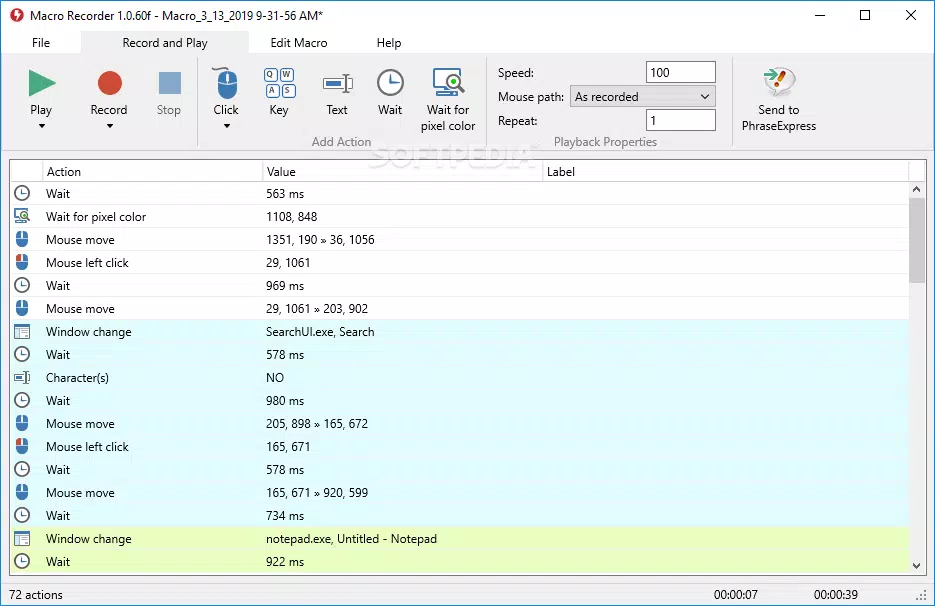
The user interface of Macro Recorder is designed with functionality in mind, prioritizing clarity and ease of access to core tools. The layout features a clean, minimalistic design with clearly labeled buttons for recording, playback, and export. Navigation is straightforward, allowing users to initiate a macro session with a single click and manage recorded sequences through a simple list view.
Visual feedback during recording is provided through real-time indicators, helping users confirm that actions are being captured correctly. The app maintains a consistent response rate across different device categories, although the developer did not list formal performance metrics. Stability during extended use appears reliable, with no reported issues related to crashes or memory leaks.
Although the developer did not specify minimum OS requirements, the application’s lightweight footprint—4.4 MB—suggests efficient resource usage. Responsiveness remains consistent during playback, even when handling complex sequences. The app’s performance is optimized for typical Windows environments, making it suitable for use on both older and modern systems. Overall, the UX is intuitive for both novice and experienced users, reducing the learning curve associated with automation tools.
Platform Compatibility & Technical Requirements
Macro Recorder is available exclusively for the Windows platform. The current version is 2.2.1, with a file size of 4.4 MB. While the developer did not specify minimum OS requirements, the application is designed to operate within standard Windows environments. Compatibility with different Windows versions was not fully disclosed, but its lightweight nature suggests broad support across recent and legacy systems.
Users should ensure their system meets general Windows requirements for running executable applications. No additional dependencies or third-party tools are required for basic functionality. The app is distributed as a standalone executable, simplifying the installation process. For users seeking to run macros on other operating systems, alternative solutions would be necessary, as cross-platform support was not indicated.
Pros and Cons
Pros
- Free to download and use, making it accessible for individual users and small teams.
- Capable of converting macros into standalone EXE files for easy distribution.
- Lightweight size (4.4 MB) ensures minimal system impact.
- Supports task scheduling for automated, recurring operations.
- Intuitive interface with straightforward navigation and clear controls.
Cons
- Platform is limited to Windows; no support for macOS or Linux was mentioned.
- Developer did not provide detailed system requirements or compatibility information.
- Limited documentation or in-app guidance for advanced features.
- No cloud integration or synchronization across devices.
- Export options may be restricted to basic formats, though specifics were not disclosed.
FAQ
Is Macro Recorder safe to download and install?
Yes, the application is distributed as a standalone executable with no known malware or intrusive behavior. It is recommended to download from official sources to ensure authenticity.
Can I use Macro Recorder on older versions of Windows?
While the developer did not specify minimum OS requirements, the app’s small size and lack of dependencies suggest compatibility with older Windows versions. Users are advised to test on their system.
Does Macro Recorder support macro sharing?
The app allows exporting macros as EXE files, which can be shared across devices. However, no built-in sharing or cloud storage features are available.
How do I update Macro Recorder?
Users should check the official website periodically for new versions. The app does not include an automatic update mechanism.
Can I record macros on multiple applications simultaneously?
Macro Recorder can capture actions across different applications during a single recording session. However, specific limitations or behavior during multi-app workflows were not detailed by the developer.
Final Thoughts + CTA
Macro Recorder stands out as a practical, no-cost solution for users seeking to automate routine tasks on Windows. Its ability to record keyboard and mouse actions, convert them into executable files, and schedule automated runs makes it a valuable asset in both personal and professional settings. While it lacks advanced features like cloud sync or multi-platform support, its core functionality is executed efficiently and reliably.
Individuals in roles such as data entry clerks, software testers, and IT administrators will benefit most from its automation capabilities. The combination of simplicity, low system requirements, and free access enhances its appeal. For those looking to reduce manual workload without investing in complex tools, Macro Recorder delivers strong value.
Download Macro Recorder now


